3D Connector
Workshop
- NEW MODEL

- RECTANGLE
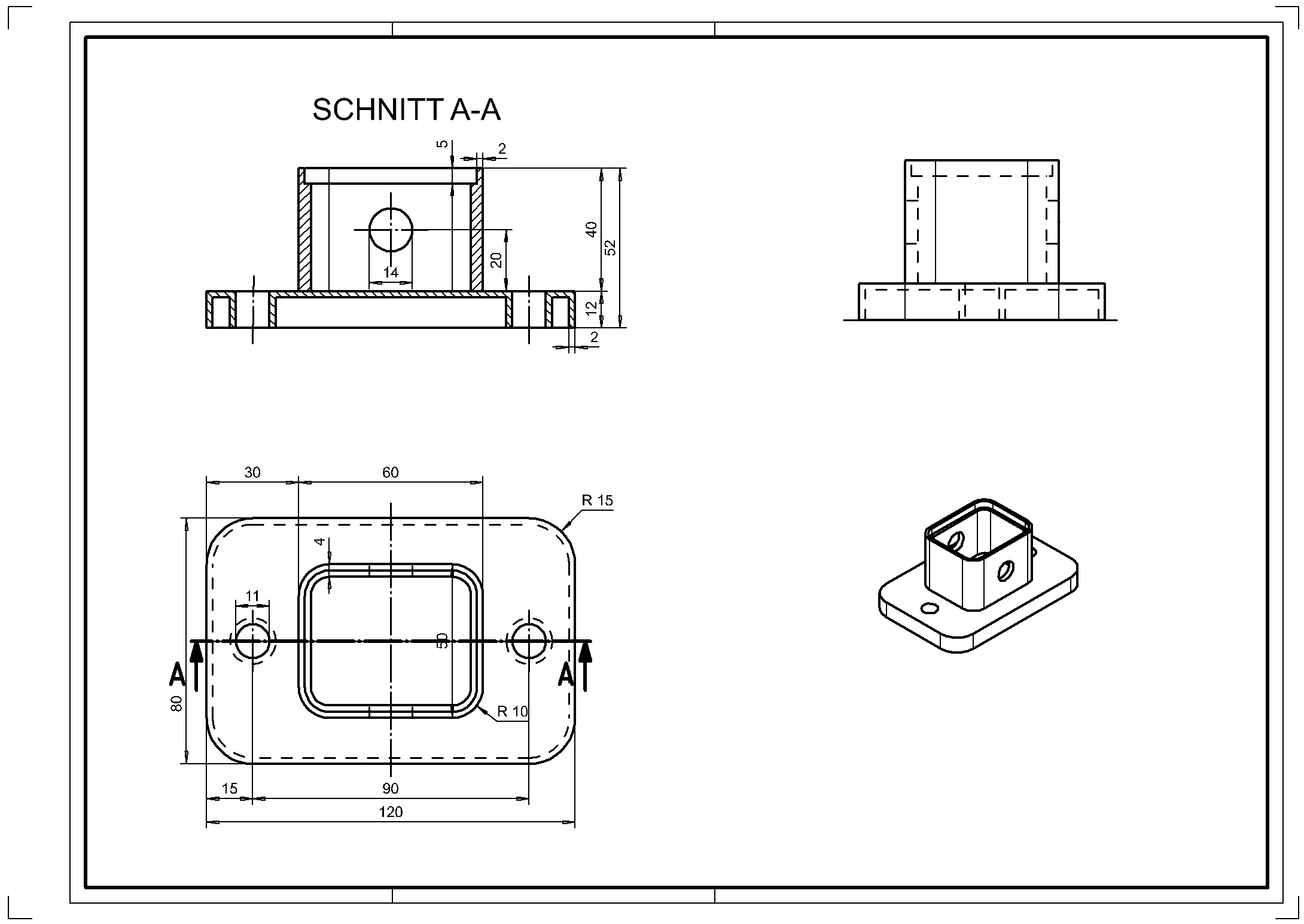
 (120 x 80) and define it as a BOX.
(height 1 = 0; height 2 = 12)
- Round corners (radius 15 mm) and draw circles (bore holes) (result is immediately visible in 3D). Measure the plate.

Tip
Switch on the 3D axes so that you have a better overview of the current work plane (WP).

- SELECT WORK PLANE ORIGIN and place it on the upper surface of the plate (snap mode on center surface).

- NEW MODEL
- Draw the upper rectangle (60 mm x 50 mm), round the corners (radius 10 mm) and enter a parallel contour (4 mm inside).

- Define as BOX (height 1 = 0; height 2 = 40) and tap both contours.

- Select WORK PLANE ON SURFACE and tap the front of the profile (60 x 50) in the shaded model. (P1)


- Draw the circle (radius 7 mm) and define it as a BOX.
(height 1 = 2; height 2 = -62).

- Perform the Boolean operation A MINUS B. (A = profile, B = bore).
ATTENTION: Object A remains.

- Place the working plane on the upper edge of the profile (60 x 50).

- Draw the contour of the recess (56 x 46) and define it as a BOX (height 1 = -5; height 2 = 2).
ATTENTION: Parts that are used for the Boolean calculation should always extend beyond the edges of the Object A!

- Perform Boolean operation A MINUS B.

- Reset the work plane. (RESET WORK PLANE)
- Parallel contour (2 mm INSIDE), draw the outer contour and hole and define it as a BOX (height 1 = -2; height 2 = 10)

- Perform Boolean operation A MINUS B.

- Save drawing temporarily.
- Now create a new plot yourself, which should look similar to the illustration below. Then set dimensions for the top view and the section.